
More bitmap editing features are
available from the Bitmap menu.
Bitmap Menu
Add Border... Please refer to the Save Image Tab chapter, Add Border section.
Rotate... On the Rotation dialog, you can choose a degree to rotate and a background color.


Rotation will always apply to the whole image, not a selection.
Brightness & Contrast...
You can make a selection and then apply the brightness & contrast changes
through the dialog.
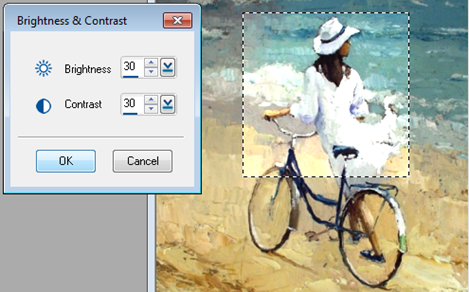
If no selection is made, it will apply to the whole image.
RGB & Hue...
You can make a selection and then apply the color changes through the dialog.
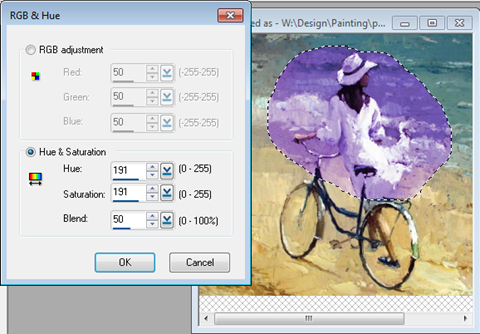
If no selection is made, it will apply to the whole image.
Smoothness...
You can make a selection and then apply the smoothness changes through the
dialog.
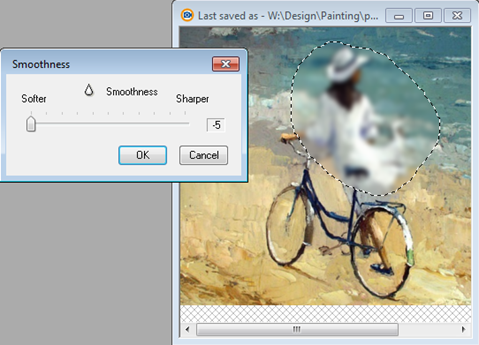
If no selection is made, it will apply to the whole image.
Gamma Correction...
You can make a selection and then apply the Gamma Correction through the dialog.

If no selection is made, it will apply to the whole image.
Threshold...

You
can make a selection and then apply the Threshold changes through the dialog.

Add Noise
You can add noise for a selection or the whole image.

Each time you choose the menu, it will add noise on top of
the current image.
Patterned Glass

Dilate

Edgee

Embosss

Erodee

Jitterr


Mix Two Images....
This menu item will be available only when there are two or more images open in
the image editor.


